Monday, November 1, 2010

Reaction to tonight's class


Lets go back to the beginning.
A new take on Smartboards
I actually walked away from tonight presentation of the Smartboard fairly excited. It seems like a massively simplified Flash mixed with Powerpoint. Right now with my limited experience with the program I feel it will be best used as a review tool for my students, currently I would like my lecture and information sections of my teacher to be bolstered with podcast, Imovie, and the rare usage of Powerpoint.

There are two glaring problems I see so far with the Notebook program. The first being a almost nonexistent grid layout (a page split in quadrants is hardly a grid). How can we properly align items on the page and respect the almighty grid when it only runs one line on the Y axis and one line on the X? I suppose if it had a ruler that would help the anemic grid system, but that's nowhere to be seen as well, guess I will just have to guess where my picas are.

I don't want to berate the program to much because I really have not had any time in the driver's seat yet, and I'm actually pretty hopeful for the potential it holds. I am very worried about the design flaws it carries with it, but I will just have to work around those, I'm sure over the next few years they will resolve it anyway. I truly feel Smartboards will be used extensively in anticipatory sets and wrap-ups in my classroom.

Interactive Whiteboards


A short review of the "article":
Interactive White Boards in 1:1 Learning Environments


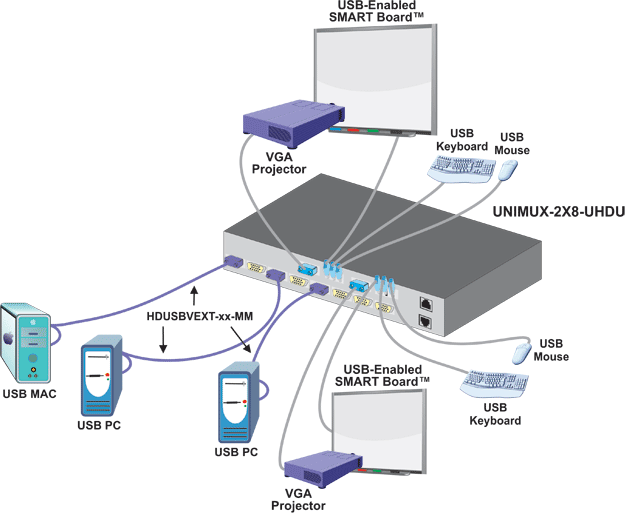
The author really needed to acclimate the reader to what an "interactive white board" is and what is does. At points the article mentions the device is "highly visual and engaging for today’s tech-savvy student", I feel in order to fully appreciate the full potential of the technology the instructor must also be "tech-savvy". A simple diagram of the whiteboard's peripherals and means of connecting them would have cleared up paragraphs of mind numbing confusion and anxiety over the devices true form and function! I provided just such a sample here:


So assuming I totally understand the ins and outs of the interactive whiteboard (which I did not until I read the wiki on it), I can finally begin to learn about how the device can interact with students and facilitate learning. There is no question that this device can help a classroom become interactive, the question however needs to be asked "do I need my classroom to be more interactive". We always talk about interactivity, but how many have stopped to think if it's necessary across the board. For art students; collaboration is not always the way to go. Solo projects are the best way for a student to practice their newly discovered techniques and hone their talents.

I appreciate the authors need to include a section on balance, but their stance on the subject is obvious and unbalanced due the fact the article is nothing more than a ten page lifeless promotional brochure. The limited exposure I have had with an interactive whiteboard has not been extensive, so I am hardly an expert on their reliability, but I would say they work properly about half of the time. For me, that reliability level is simply not high enough when you consider a sheet of velum and a few 2B pencils have a nearly 100 percent success rate.

Here is a link to some other criticism against the interactive whiteboards.